Everypaper workbooks
Pick a workbook made by teachers and start solving.
Every moment of life, from elementary school to seniors
Everypaper is an app for solving workbooks on screen with a pen. Keep Everypaper workbooks, mock exams and the books you bought in one place, and wrong answers go into your note automatically.
All you need is a Google account.
 Everypaper
Mock exam · Science · for 2026
Look at the figure and explain the change in the state of matter.
What Everypaper is
There are three kinds of workbooks: ones made by Everypaper, mock exams, and publisher workbooks you bought at a bookstore. Open one and solve it with a pen, just like a paper book.
Pick a workbook made by teachers and start solving.
Past exam workbooks sorted by year, all in one place. Try the real past questions.
Take a photo of the receipt for a workbook you bought and solve it on screen. Missing a book? Tell us with “Request a workbook”.
Search by book name or type, and show only a subject or your favorites. Sort by newest, name, or most solved.
Tap the creator name on a card (Everypaper, a teacher, or a publisher) to see only that creator's workbooks.
Write with the pen, turn pages with a finger. Lasso a handwritten answer and it is read as text into the answer box.
Re-solve 10 questions a day from what you got wrong in the last 3 days. Exam countdowns and this week's goal are on Home too.
A teacher's video sits under the written solution. Keep it in a small window and listen while you look at the question.
Still stuck after the solution? Ask an AI that knows this question. It starts from the concept and draws graphs and shapes to explain.
NEW · September 2026
We added two things so you don't get stuck on a question you don't understand.
A video of a teacher working through the question sits under the written solution. Tap the “Video” button next to the solution to jump there, and keep the window open while you look at the question.
Tap the tab next to the answer and solution to talk with an AI that already knows this question. It does not just give the answer: it builds the concept, draws graphs and shapes, and adds tap-to-open word explanations for hard terms.
It uses the subscription AI already on your computer (Claude Code, Codex, Antigravity). No API key to buy or register, and no extra fees. Connect it once in Settings › AI agent.
Real screens
Screens captured from the live service, in order: pick a workbook, solve it, and see the record it leaves.
Home
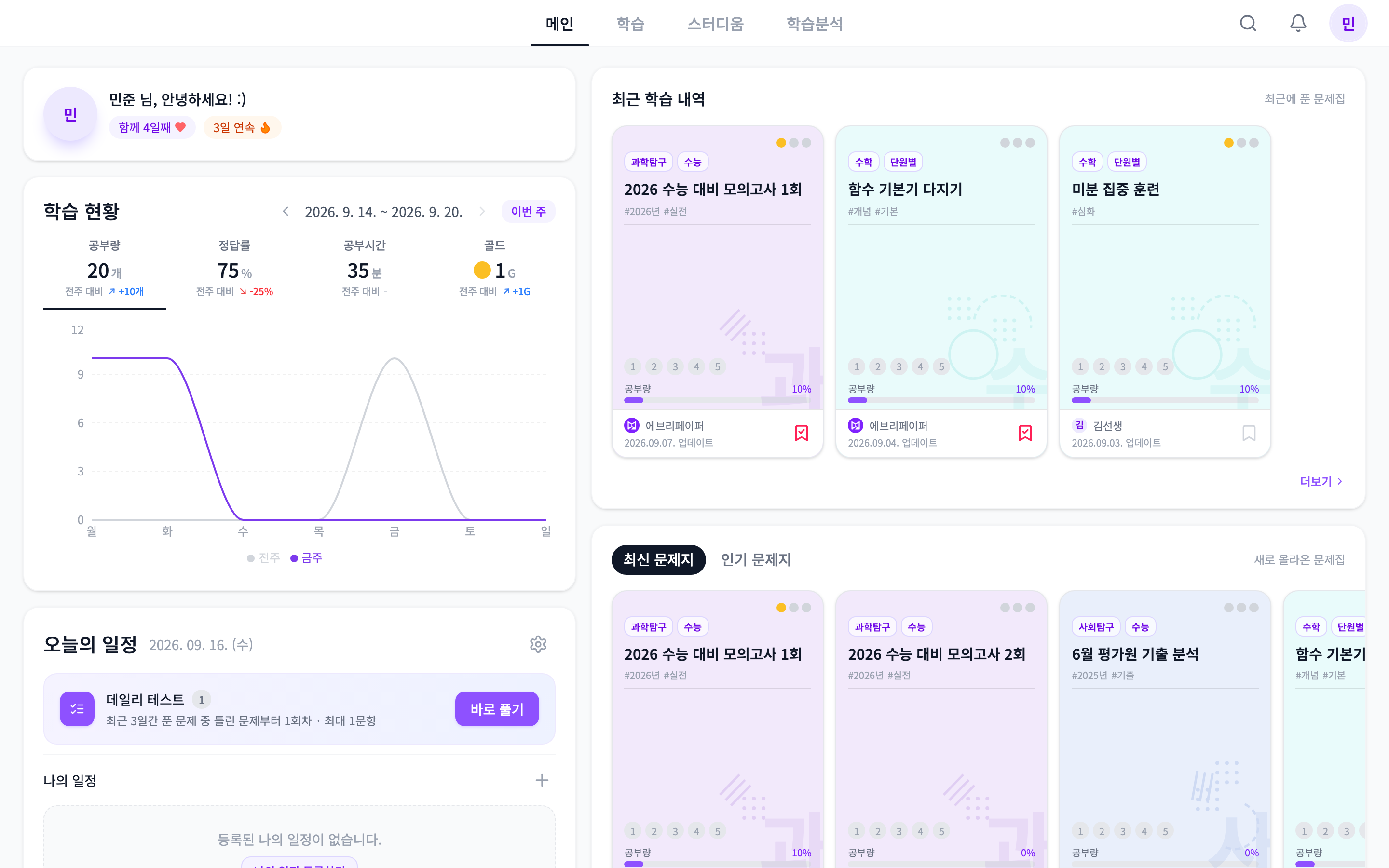
See this week's study amount, recently solved workbooks, and today's daily test right on Home.
Answers, handwriting and favorites save automatically
Write with a pen, turn pages with a finger
Wrong-answer note, daily test, weekly goal
Video solutions and Ask the AI
Only the workbooks you own, for your own study
Anyone, at any age
Elementary students doing homework, high schoolers preparing for exams, adults and seniors picking up study again. Choose a workbook for your age and solve at your own pace. We kept what is good about paper books and removed only the hassle.
Everypaper Grader for teachers
Register an answer key and an OMR card is created. Photograph the OMR cards students filled in, and grading and score reports are done in one go.
Publisher partnership
Put a paper workbook on Everypaper and it becomes one that students solve on screen, get graded on, and keep wrong-answer records for. Build new opportunities such as digital sales and subscriptions from the content you already have.
Start today
Sign in with Google and pick your first workbook.